

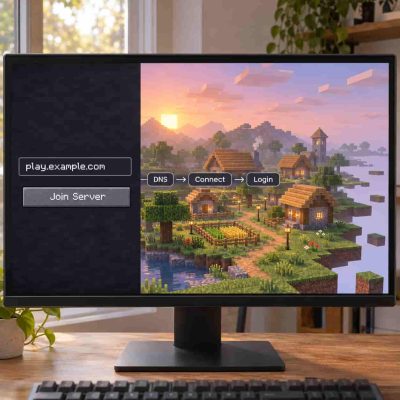
 You enter an address, click Join Server, and wait for the terrain to appear. When you connect to Minecraft servers, your game has to find the right machine, establish a connection, and exchange enough information to put you in the world. Each stage can fail for a different reason, which explains why a misspelled address and an incompatible game version produce different errors. Here’s what happens during a typical Java Edition connection, from typing the server address to taking your first step.
Minecraft Reads the Hostname and Port
An address such as
play.example.com gives Minecraft a hostname, which it can look up using Domain Name System (DNS). An entry such as play.example.com:25570 also supplies a port, which tells your client which service to contact at the destination. One machine can host several services on different ports, including multiple Minecraft servers. Java Edition normally uses port 25565 when the address supplies no port and no service record directs it elsewhere. If you enter a numerical IP address, Minecraft already has the number it needs and can skip the hostname lookup.DNS Finds the Destination
When you enter a hostname, the client uses the Domain Name System, or DNS, to find an IP address. An A record supplies an IPv4 address, while an AAAA record supplies an IPv6 address. Your device or DNS resolver may already have a recent answer cached. If you mistype the name or DNS cannot produce a usable answer, the game may report an unknown host before it ever reaches a Minecraft server.
A Java Edition server can also use a DNS service record, called an SRV record, so players can type a friendly name without remembering a custom port. For example, the operator could direct players who enter play.example.com to node.example.com on port 25570. The client can resolve that target hostname to an IP address and contact the specified port.
The Client Contacts the Server
Once it has a destination, the Java client opens a TCP connection. TCP gives Minecraft an ordered stream of data and retransmits missing data. If the connection times out, the client received no successful response in time. If it is refused, the connection attempt was actively rejected, often because nothing is listening on that port. A correct DNS result can still lead to either error if the destination is unreachable or the service is unavailable.
That connection begins with TCP’s three-way handshake. Your device sends a request, the destination acknowledges it and sends its own request, and your device acknowledges the reply. Only then does Minecraft send its own handshake to tell the game server what it wants to do.
If the server is already in your Multiplayer list, the client can make a separate status request. That request can retrieve the server’s description, advertised version, and reported player count. When you select Join Server, the client opens a connection to log in. Seeing a player count means the status request got a response. Login still has to succeed.
Minecraft Starts the Login and Configuration Process
After TCP connects, the client sends a Minecraft handshake with its protocol version and its intent to log in. An incompatible version can stop the process here. On a standard Java server with online authentication enabled, the client and server establish encryption and use Minecraft’s session service to verify the player’s identity. The server can also reject a login because the player is banned, the server is full, or an allowlist limits who can join.
On modern Java versions, successful login leads to a configuration stage. The server sends the client information it needs to interpret the world, such as registry data for dimensions and biomes. A server may also offer a resource pack. If the server requires it and you decline, the session can end even after the account check succeeds.
The World Loads Around You
In the Play stage, the server tells the client which world to enter and where to place your character. Returning players can resume from a saved position. It sends nearby terrain in chunks, along with lighting and entity information. The client draws that part of the world while the server sends more data as you move. Once you start playing, the client reports actions such as movement and block interactions, and the server sends updates so players see the resulting changes.
On a larger network, the public address may lead to a proxy such as Velocity. The proxy accepts the connection and connects you to a backend server, often a lobby. A menu there can take you to Survival or a minigame without making you type another address.
Bedrock Edition follows the same broad idea of finding a destination, establishing a session, and loading the world, but it uses a different protocol. Its dedicated server defaults to port 19132 for IPv4. Use the address and port supplied for your edition, especially on networks that welcome both Java and Bedrock players.
The point where joining stalls can help you narrow down what to check. An unknown host points you toward the spelling or DNS, a refusal points toward the port or the service listening there. A version message means your client reached a server that could respond. Once the terrain starts drawing, you’ve reached the stage where Minecraft is exchanging the data that lets you see and interact with the world.